Aproape fiecare companie mică din România are aceeași poveste. Au cumpărat un domeniu de la un provider local, iar providerul le-a oferit "bonus" emailuri nelimitate prin cPanel. Setup rapid, fără costuri lunare separate, totul sub un singur panou. Pare ideal. Nu este.
Almost every small Romanian company has the same story. They bought a domain from a local provider, and the provider threw in "bonus" unlimited emails through cPanel. Quick setup, no separate monthly costs, everything under one panel. Sounds ideal. It isn't.
De ce emailul de hosting e o problemăWhy hosting email is a problem
Providerii de hosting au o prioritate foarte simplă, să nu ajungă pe liste de spam. Dacă tu, unul din sutele de clienți de pe același server, trimiți accidental spam (sau ești compromis și malware-ul îți trimite emailuri), întregul IP al serverului ajunge pe blackliste. Asta înseamnă că toți ceilalți clienți suferă alături de tine.
Hosting providers have one very simple priority, avoiding spam blacklists. If you, one of hundreds of clients on the same server, accidentally send spam (or you're compromised and malware sends emails through you), the entire server IP lands on blacklists. That means all other clients suffer alongside you.
Ca să prevină asta, providerii implementează filtre anti-spam agresive pe emailurile trimise. Cu alte cuvinte, nu te protejează pe tine de ce primești. Te protejează pe ei (și pe alții) de ce trimiți tu. Subtilă dar crucială diferență.
To prevent this, providers implement aggressive anti-spam filters on outgoing emails. In other words, they don't protect you from what you receive. They protect themselves (and others) from what you send. Subtle but crucial difference.
Emailurile pe care le trimiți tu ajung în spam la destinatari, pentru că IP-ul serverului și reputația domeniului sunt slabe. Iar emailurile de phishing care ajung la tine trec prin filtre slabe. Ce primești din plin, ce trimiți ajunge greu.
Emails you send end up in recipients' spam, because the server IP and domain reputation are weak. And phishing emails reaching you slip through weak filters. What you receive floods in, what you send barely arrives.
Microsoft 365, o alegere care se plătește singurăMicrosoft 365, a choice that pays for itself
La același preț cu Google Workspace, Microsoft 365 Business Standard oferă:
- Exchange Online (email cu infrastructură dedicată, IP-uri cu reputație excelentă)
- Aplicațiile Office instalate local, Word, Excel, PowerPoint, Outlook, Access, Publisher, OneNote
- Microsoft Teams pentru comunicare internă și apeluri
- 1TB OneDrive per utilizator
- SharePoint pentru colaborare pe documente
- Anti-spam și anti-phishing la nivel enterprise (Exchange Online Protection)
At the same price as Google Workspace, Microsoft 365 Business Standard offers:
- Exchange Online (email with dedicated infrastructure, reputable IPs)
- Office apps installed locally, Word, Excel, PowerPoint, Outlook, Access, Publisher, OneNote
- Microsoft Teams for internal communication and calls
- 1TB OneDrive per user
- SharePoint for document collaboration
- Enterprise-grade anti-spam and anti-phishing (Exchange Online Protection)
Google Workspace oferă variantele web ale aplicațiilor Google, Docs, Sheets, Slides. Funcționale, dar încă limitate față de desktop Office pentru muncă serioasă cu documente complexe, referințe, formule avansate.
Google Workspace offers web versions of Google apps, Docs, Sheets, Slides. Functional, but still limited compared to desktop Office for serious work with complex documents, references, advanced formulas.
Migrarea nu e dificilă
O migrare de la cPanel la Microsoft 365 pentru o companie de 10, 20 de angajați durează tipic 2, 3 zile de lucru, fără downtime vizibil. Se configurează Exchange Online, se mută emailurile vechi, se schimbă MX records, se reconfigurează clienții (sau se folosesc pe mai departe aceiași). Pentru utilizatori, experiența este că primesc parole noi și atât.
Migration from cPanel to Microsoft 365 for a 10-20 employee company typically takes 2-3 working days with no visible downtime. You configure Exchange Online, transfer old emails, change MX records, reconfigure clients (or keep the same ones). For users, the experience is just getting new passwords.
DKIM, DMARC și SPF, trei piese care nu lipsesc niciodatăDKIM, DMARC and SPF, three pieces that never go missing
Astea sunt trei standarde tehnice care stau în DNS-ul domeniului tău. Împreună, ele spun lumii, "emailurile care pretind că vin de la mine sunt reale doar dacă îndeplinesc aceste condiții". Fără ele, oricine îți poate falsifica adresa (spoofing), trimițând emailuri care par că vin de la [email protected] dar vin de fapt de la un atacator.
These are three technical standards living in your domain's DNS. Together, they tell the world, "emails claiming to be from me are real only if they meet these conditions". Without them, anyone can forge your address (spoofing), sending emails that look like they come from [email protected] but actually come from an attacker.
SPF, cine are voie să trimită de la mine
SPF (Sender Policy Framework) e o listă publică în DNS cu serverele autorizate să trimită email de la domeniul tău. Dacă primești un email de la firma.ro dar a fost trimis de pe un server care nu e în lista SPF, destinatarul îl poate respinge automat.
SPF (Sender Policy Framework) is a public DNS list of servers authorised to send email from your domain. If someone receives an email from firma.ro but it was sent from a server not in the SPF list, the recipient can automatically reject it.
DKIM, semnătura digitală
DKIM (DomainKeys Identified Mail) adaugă o semnătură criptografică pe fiecare email trimis. Destinatarul verifică semnătura folosind o cheie publică din DNS-ul tău. Dacă semnătura e invalidă, emailul e suspect.
DKIM (DomainKeys Identified Mail) adds a cryptographic signature to every email sent. The recipient verifies the signature using a public key from your DNS. If the signature is invalid, the email is suspect.
DMARC, regula de decizie
DMARC combină SPF și DKIM și spune destinatarului ce să facă cu emailurile care eșuează verificările. Le respinge? Le pune în spam? Le primește dar raportează? Tu decizi, și primești rapoarte săptămânale despre cine încearcă să falsifice domeniul tău.
DMARC combines SPF and DKIM and tells the recipient what to do with emails that fail checks. Reject them? Send to spam? Accept but report? You decide, and receive weekly reports about who's trying to forge your domain.
La majoritatea companiilor pe care le-am verificat, DMARC e setat pe p=none. Asta înseamnă că e ca și cum nu l-ai avea deloc, primești rapoarte, dar nu se întâmplă nimic cu emailurile false. Atacatorii pot falsifica liber domeniul tău. Trebuie trecut pe p=quarantine sau p=reject după o perioadă de monitorizare.
At most companies I've checked, DMARC is set to p=none. That means it's as if you don't have it at all, you receive reports but nothing happens to fake emails. Attackers can freely spoof your domain. It needs to move to p=quarantine or p=reject after a monitoring period.
Cum verifici cum stai
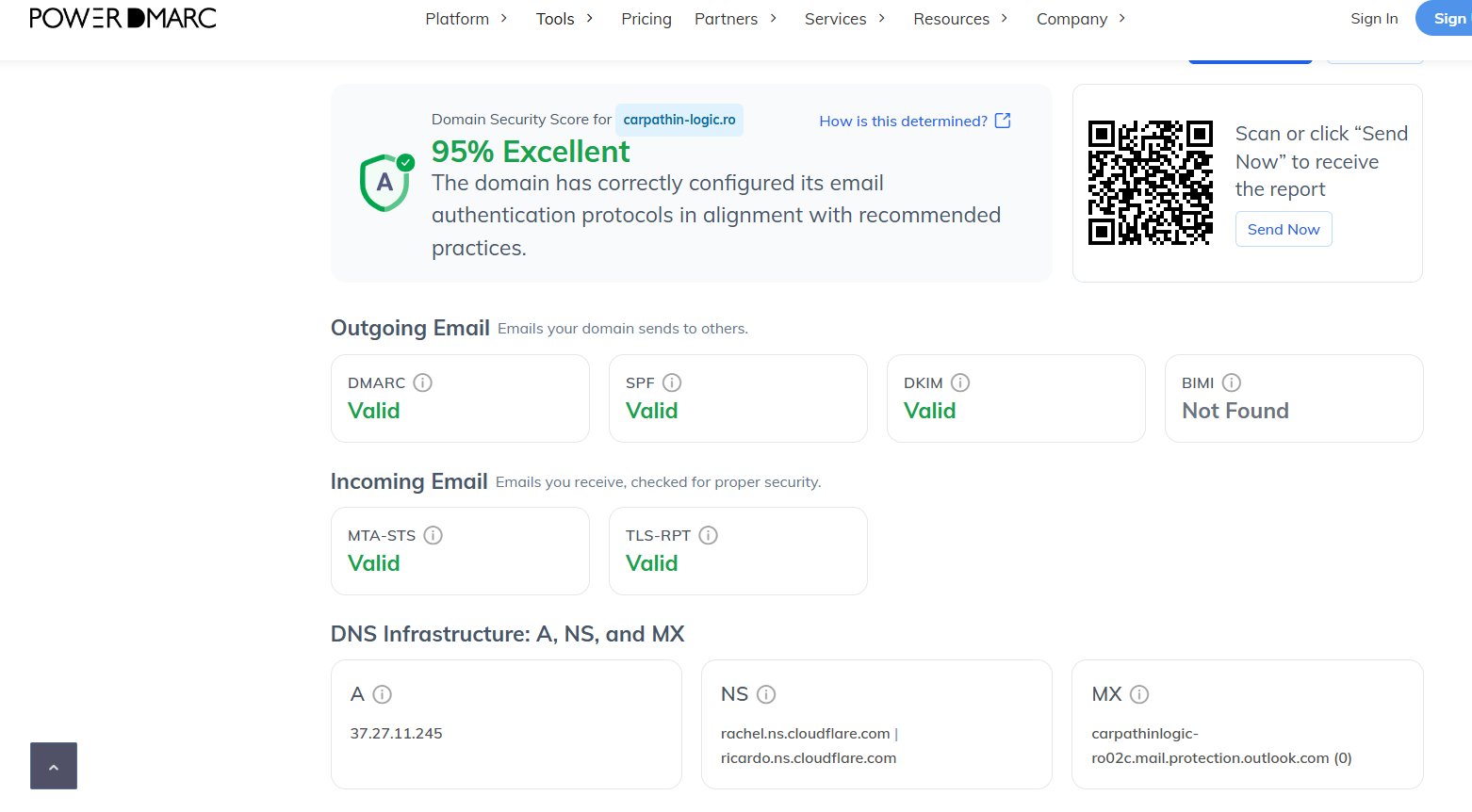
Folosește PowerDMARC sau EasyDMARC. Introduci domeniul tău și primești un raport detaliat, ce ai configurat corect, ce lipsește, ce scor ai față de best practices.
Use PowerDMARC or EasyDMARC. Enter your domain and get a detailed report, what you've configured correctly, what's missing, what score you have against best practices.
Banner pentru emailuri externeExternal email banner
Un banner vizual aplicat automat emailurilor venite din afara organizației este una dintre cele mai eficiente apărări anti-phishing. Dacă cineva îți scrie pretinzând că e colegul tău Claudiu, dar emailul vine de la [email protected], bannerul colorat în partea de sus a emailului te alertează imediat.
A visual banner applied automatically to emails from outside the organisation is one of the most effective anti-phishing defences. If someone writes pretending to be your colleague Claudiu, but the email comes from [email protected], the coloured banner at the top of the email alerts you immediately.

Dacă emailul e din interior (un coleg real), bannerul nu apare. Intuitiv știi că poți avea încredere.
If the email is from inside (a real colleague), the banner doesn't appear. You intuitively know you can trust it.
Microsoft 365 vs Google Workspace
Aici Microsoft 365 câștigă clar, bannerul extern se activează nativ, gratuit, cu două click-uri în Exchange Online. Poți personaliza textul, culoarea, când se aplică, dacă să apară pe lanțurile de răspuns, totul fără nici un cost suplimentar.
Here Microsoft 365 clearly wins, the external banner activates natively, free, with two clicks in Exchange Online. You can customise the text, colour, when it applies, whether it shows on reply chains, all without any extra cost.
Pe Google Workspace, funcționalitatea nativă e mult limitată. Maxim poți seta să se modifice subject-ul emailurilor externe (ex: [EXTERN] subject original). Pentru un banner vizual colorat în corpul emailului, trebuie soluție third-party cum ar fi Exclaimer, care costă extra per utilizator pe lună.
On Google Workspace, native functionality is much more limited. At most you can modify the subject of external emails (e.g. [EXTERNAL] original subject). For a coloured visual banner in the email body, you need a third-party solution like Exclaimer, which costs extra per user per month.
Rețeaua, mai mult decât un router de la DigiThe network, more than a Digi router
Am auzit odată de la un client, "am două routere, e mai sigur, nu mă fac hakerii". Și nu avea două routere. Avea un ONT (terminalul de la provider) și un router consumer după el. Două cutii, da, dar nici una nu era un router adevărat configurat pentru securitate.
I once heard from a client, "I have two routers, it's safer, hackers can't get me". And he didn't have two routers. He had an ONT (provider terminal) and a consumer router behind it. Two boxes, yes, but neither was a real router configured for security.
Pentru un SMB (Small and Medium Business, companie mică sau medie), routerul consumer de la ISP e nepotrivit. Nu are vizibilitate în rețea, nu are IDS/IPS, nu poate face VPN decent, nu gestionează bine wifi-ul pentru mai mult de câteva device-uri.
For an SMB (Small and Medium Business), the consumer router from the ISP is inadequate. No network visibility, no IDS/IPS, can't do decent VPN, doesn't handle wifi well for more than a few devices.
De ce UniFi
Lucrez în mare parte cu gama UniFi de la Ubiquiti. Motivul, oferă exact ce are nevoie un business mic sau mediu, fără complexitatea (și costul) unui Cisco, Meraki, FortiGate sau WatchGuard.
I mostly work with the UniFi range from Ubiquiti. The reason, it offers exactly what a small or medium business needs, without the complexity (and cost) of Cisco, Meraki, FortiGate or WatchGuard.
Ce face UniFi bine:
- Vizibilitate în rețea, un UI curat, organizat, care arată traficul per dispozitiv și per port. Vezi imediat ce consumă bandwidth, cine face ce.
- Wifi controlat, dacă un dispozitiv merge greu, vezi direct de ce, putere semnal slab, canal aglomerat, client prea departe de access point.
- IDS/IPS integrat, Intrusion Detection and Prevention System. Detectează tentative de atac în rețea și le poate bloca automat.
- VPN ușor, client VPN pentru angajați remote sau site-to-site VPN între două birouri, configurate în câteva minute.
- Failover internet, dacă linia principală pică, trece automat pe cea de backup (de exemplu, 4G).
What UniFi does well:
- Network visibility, a clean, organised UI showing traffic per device and per port. You immediately see what's consuming bandwidth, who's doing what.
- Controlled wifi, if a device is slow, you see directly why, weak signal, crowded channel, client too far from access point.
- Integrated IDS/IPS, Intrusion Detection and Prevention System. Detects attack attempts on the network and can block them automatically.
- Easy VPN, client VPN for remote employees or site-to-site VPN between two offices, configured in minutes.
- Internet failover, if the main line drops, it automatically switches to backup (e.g. 4G).
Ce hardware alegi
Pentru un birou mic de 5, 15 persoane, UniFi Cloud Gateway e arhisuficient. Pentru 20, 50+ persoane sau dacă vrei performanță mai bună și mai multă flexibilitate, UDM Pro (Dream Machine Pro) e alegerea mea implicită, gateway, switch controller, și înregistrare video (dacă adaugi camere UniFi Protect) într-un singur rack-unit.
For a small office of 5-15 people, the UniFi Cloud Gateway is more than enough. For 20-50+ people or if you want better performance and more flexibility, the UDM Pro (Dream Machine Pro) is my default choice, gateway, switch controller, and video recording (if you add UniFi Protect cameras) in a single rack-unit.
Dacă alegi camere UniFi Protect, poți adăuga și un modul AI Key care ajută enorm la identificarea imaginilor. De exemplu, dacă îți aduci aminte că persoana care a intrat la tine în firmă purta o cămașă albă, pantaloni negri și o geacă pufoasă albă, sau venea cu un Audi TT, poți căuta în footage direct după acești indicatori. UniFi îți arată doar imaginile care au match pe ce ai căutat. Pentru un business cu flux mare de oameni, asta economisește ore întregi de vizionat înregistrări.
If you choose UniFi Protect cameras, you can add an AI Key module that helps enormously with image identification. For example, if you remember the person who came to your company was wearing a white shirt, black trousers and a puffy white jacket, or came in an Audi TT, you can search the footage directly by these indicators. UniFi shows you only the frames that match your search. For a business with high foot traffic, this saves hours of watching recordings.
Pentru companii cu nevoi complexe (redundanță la nivel enterprise, MPLS, firewall-uri certificate), atunci se merge pe Cisco sau FortiGate. Dar 90% din SMB-urile pe care le-am văzut nu au nevoie de atât.
For companies with complex needs (enterprise-level redundancy, MPLS, certified firewalls), then you go with Cisco or FortiGate. But 90% of SMBs I've seen don't need that much.
VPN, când și cumVPN, when and how
Două scenarii comune unde VPN e util:
Two common scenarios where VPN is useful:
Client VPN. Angajații care lucrează remote se conectează la rețeaua companiei ca și cum ar fi fizic la birou. Util pentru acces la resurse interne (servere, printere, NAS-uri) care nu sunt expuse public pe internet.
Client VPN. Remote employees connect to the company network as if physically in the office. Useful for accessing internal resources (servers, printers, NAS) not exposed publicly on the internet.
Site-to-site VPN. Două birouri în orașe diferite, conectate ca și cum ar fi în aceeași rețea. Util pentru companii cu mai multe locații care trebuie să partajeze resurse. Se configurează între două gateway-uri UniFi în mai puțin de 15 minute.
Site-to-site VPN. Two offices in different cities, connected as if on the same network. Useful for companies with multiple locations that need to share resources. Configured between two UniFi gateways in under 15 minutes.
NordVPN, ExpressVPN și celelalte sunt servicii diferite, pentru privacy personală și ocolirea restricțiilor geografice, nu pentru securitatea business-ului tău. Nu le confunda.
NordVPN, ExpressVPN and others are different services, for personal privacy and geo-restriction bypass, not for your business security. Don't confuse them.
"IT-ul nu e un moft. Nu e doar pentru cei mari. IT-ul este o necesitate pentru orice business, oricât de mic sau mare ar fi." "IT isn't a luxury. It isn't just for the big players. IT is a necessity for any business, no matter how small or large."
Concluzie, infrastructura e sănătatea companieiConclusion, infrastructure is the company's health
Un email hostat corect, un domeniu configurat cu DKIM/DMARC/SPF, o rețea cu vizibilitate și control. Nimic din toate astea nu e spectaculos, dar împreună formează fundația de încredere a unei companii moderne.
Properly hosted email, a domain configured with DKIM/DMARC/SPF, a network with visibility and control. None of this is spectacular, but together they form the trust foundation of a modern company.
"Infrastructura IT nu se vede. Până într-o zi când se vede, și atunci e prea târziu." "IT infrastructure isn't visible. Until the day it is, and by then it's too late."
Dacă vrei să vedem împreună unde stai cu emailul și rețeaua, scrie-mi la [email protected]. Un scan PowerDMARC durează 30 de secunde și îți spune multe.
If you want us to look together at where you stand with email and network, write to me at [email protected]. A PowerDMARC scan takes 30 seconds and tells you a lot.