În cei peste 5 ani de MSP am văzut aceleași probleme repetate în zeci de companii. Nu sunt probleme exotice, sunt lucruri de bun simț care lipsesc. Lista asta e din experiența directă: dacă ai toate cele 10 puncte bifate, ești deja mai sigur decât 80% din business-urile din România.
In over 5 years of MSP I've seen the same problems repeated across dozens of companies. They're not exotic, they're common-sense things that are missing. This list comes from direct experience: if you tick all 10 boxes, you're already more secure than 80% of Romanian businesses.
1.Password manager, pentru toțiPassword manager, for everyone
Parolele scrise pe post-it-uri lipite de monitor sau salvate într-un fișier Excel numit „parole.xlsx" sunt încă realitate în 2025. Un password manager rezolvă toate problemele: generează parole unice puternice pentru fiecare cont, le stochează criptate și le completează automat.
Passwords written on sticky notes on the monitor or saved in an Excel file called "passwords.xlsx" are still reality in 2025. A password manager solves all the problems: it generates unique strong passwords for each account, stores them encrypted, and fills them in automatically.
Eu recomand 1Password pentru uz personal și Keeper pentru business, ambele au audit-uri de securitate riguroase, interfețe curate și funcționează pe toate platformele. Keeper are în plus controale administrative pentru companii: pot vedea cine accesează ce, pot forța politici de parole, pot revoca accesul instant când un angajat pleacă.
I recommend 1Password for personal use and Keeper for business, both have rigorous security audits, clean interfaces and work across all platforms. Keeper additionally has administrative controls for companies: you can see who accesses what, enforce password policies, and revoke access instantly when an employee leaves.
Parolele salvate în Chrome sunt accesibile oricărei extensii rău-intenționate instalate în browser. Malware-ul și adware-ul vizează în mod specific browserul pentru că acolo stau cele mai multe parole. Un password manager dedicat izolează parolele într-un seif criptat separat, la care browserul și extensiile nu au acces direct.
Passwords saved in Chrome are accessible to any malicious extension installed in the browser. Malware and adware specifically target browsers because that's where most passwords live. A dedicated password manager isolates passwords in a separate encrypted vault, which the browser and extensions can't access directly.
2.MFA peste tot, obligatoriuMFA everywhere, mandatory
Multi-Factor Authentication (MFA) adaugă un al doilea strat de verificare peste parolă: un cod dintr-o aplicație pe telefon, un SMS, sau o cheie fizică. Chiar dacă cineva îți fură parola, fără al doilea factor nu poate intra în cont.
Multi-Factor Authentication (MFA) adds a second layer of verification on top of the password: a code from an app on your phone, an SMS, or a physical key. Even if someone steals your password, without the second factor they can't get into the account.
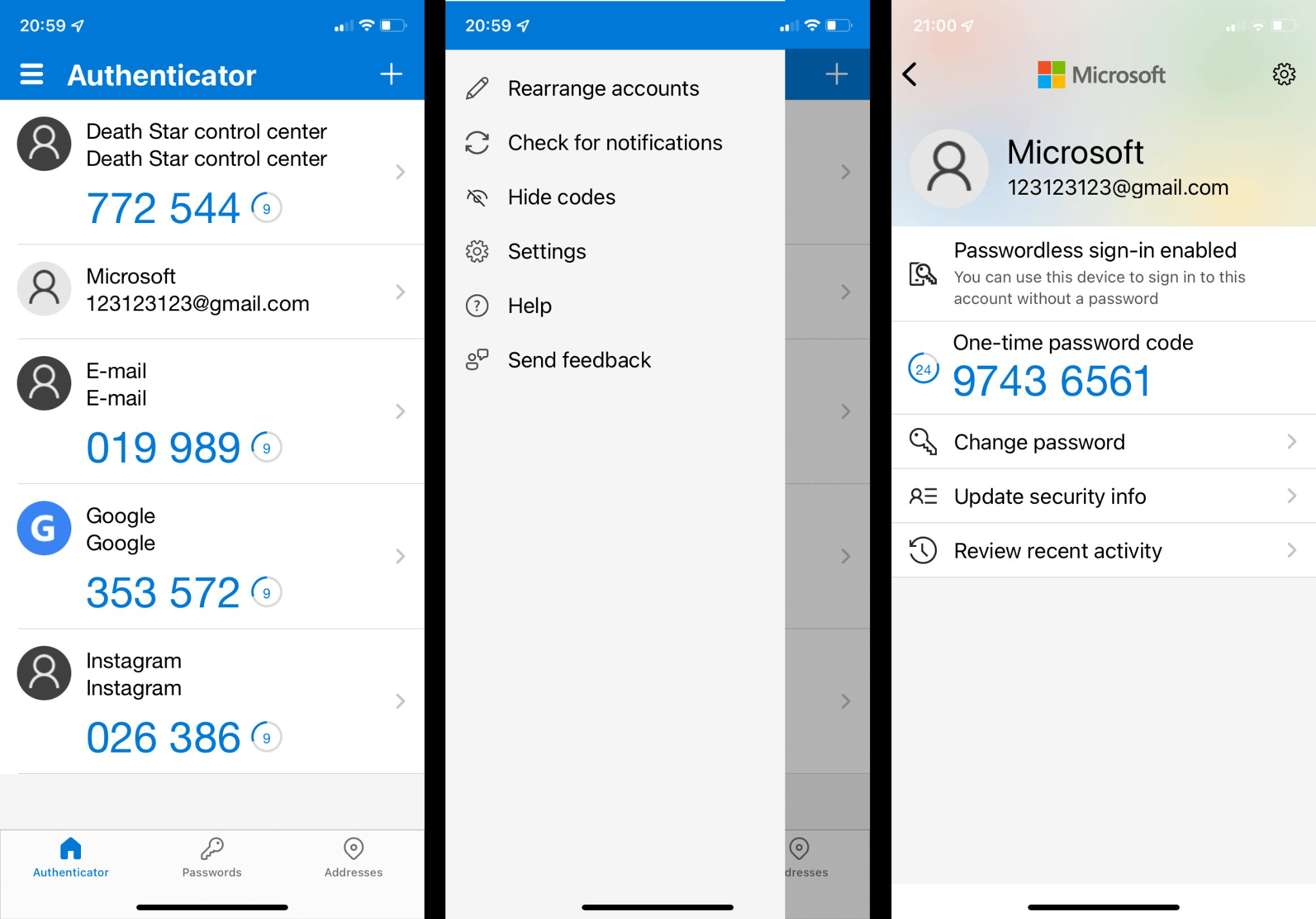
Aplicația pe care o recomand este Microsoft Authenticator, e gratuită, funcționează cu orice serviciu care suportă MFA standard, și are un bonus important: pentru conturile Microsoft, poți folosi passwordless sign-in, te loghezi doar cu o confirmare din aplicație, fără să mai scrii nicio parolă.
The app I recommend is Microsoft Authenticator, it's free, works with any service that supports standard MFA, and has an important bonus: for Microsoft accounts, you can use passwordless sign-in, you log in with just a confirmation from the app, without typing any password.
Dacă furnizorul tău de email nu suportă MFA, schimbă-l astăzi. Nu mâine. Fără MFA, parola e singurul lucru care stă între atacator și inbox-ul tău, iar parolele se fură zilnic din breșe de securitate.
If your email provider doesn't support MFA, change it today. Not tomorrow. Without MFA, the password is the only thing between an attacker and your inbox, and passwords are stolen daily from security breaches.
3.Antivirus, BitdefenderAntivirus, Bitdefender
Nu mai e o surpriză pentru nimeni că trebuie antivirus. Recomand Bitdefender oricând, oriunde, și nu doar pentru că e unul dintre cele mai bune produse din lume (a primit constant note maxime în teste independente ca AV-Test), ci și pentru că este un produs românesc. Companiile locale merită suport, mai ales când fac produse de calitate internațională.
It's no longer a surprise to anyone that antivirus is necessary. I recommend Bitdefender anywhere, anytime, not only because it's one of the best products in the world (it's consistently scored top marks in independent tests like AV-Test), but also because it's a Romanian product. Local companies deserve support, especially when they make products of international quality.
Pentru un laptop personal, Bitdefender Antivirus Plus este suficient. Pentru o companie, lucrurile se schimbă, ai nevoie de EDR.
For a personal laptop, Bitdefender Antivirus Plus is enough. For a company, things change, you need EDR.
4.EDR pentru business, GravityZoneEDR for business, GravityZone
EDR (Endpoint Detection and Response) este următorul nivel după antivirus tradițional. Diferența: antivirusul clasic caută semnături cunoscute ale virușilor, EDR monitorizează comportamentul dispozitivelor și detectează activități suspecte, chiar și pentru amenințări noi care nu sunt încă în baza de date a nimănui.
EDR (Endpoint Detection and Response) is the next level beyond traditional antivirus. The difference: classic antivirus looks for known virus signatures, EDR monitors device behaviour and detects suspicious activity, even for new threats that aren't yet in anyone's database.
Bitdefender GravityZone este soluția mea preferată pentru companii: o consolă centralizată de unde vezi toate dispozitivele, primești alerte când ceva e suspect, și poți izola un laptop infectat cu un click înainte să se răspândească malware-ul în rețea.
Bitdefender GravityZone is my preferred solution for companies: a centralised console where you see all devices, receive alerts when something is suspicious, and can isolate an infected laptop with one click before malware spreads across the network.
5.BitLocker, criptare gratuităBitLocker, free encryption
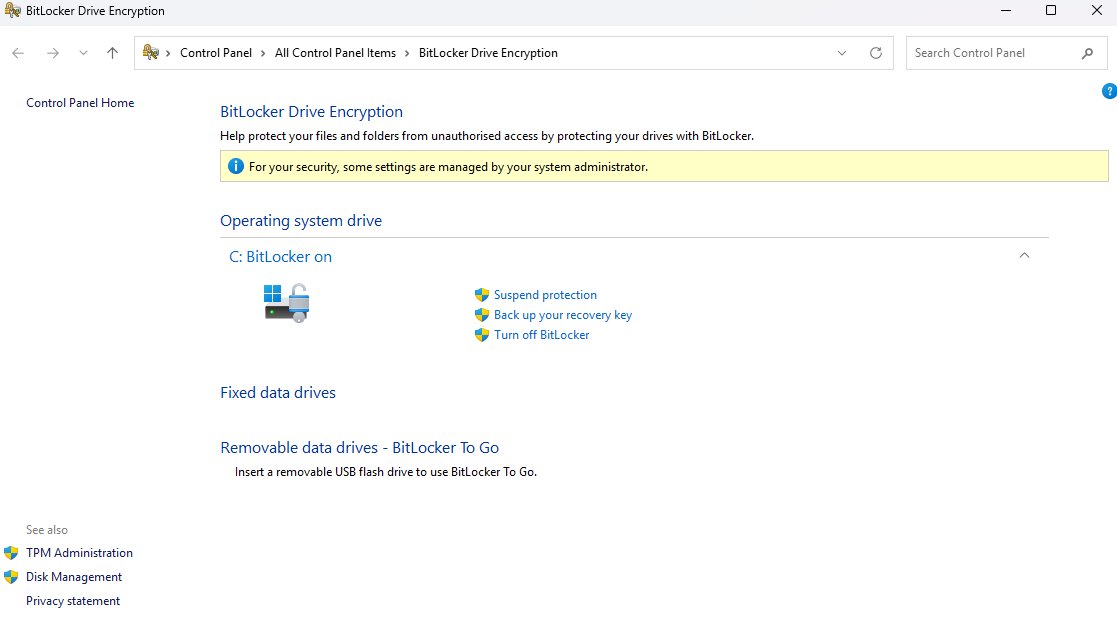
BitLocker este o funcționalitate de criptare integrată în Windows (Pro, Enterprise, Education), gratuită. Și e una dintre cele mai importante protecții pe care le poți activa.
BitLocker is an encryption feature built into Windows (Pro, Enterprise, Education), free. And it's one of the most important protections you can enable.
De ce contează: dacă un hoț îți fură laptopul sau desktop-ul și nu ai BitLocker, poate scoate pur și simplu SSD-ul sau HDD-ul, îl conectează la un alt calculator, și citește absolut tot ce ai pe el, fișiere, parole salvate, emailuri, tot. Nu contează că ai parolă la Windows, parola aia protejează doar logarea, nu și discul.
Why it matters: if a thief steals your laptop or desktop and you don't have BitLocker, they can simply remove the SSD or HDD, connect it to another computer, and read absolutely everything on it, files, saved passwords, emails, everything. It doesn't matter that you have a Windows password, that password only protects login, not the disk.
Cu BitLocker activat, tot discul e criptat. Fără cheia de decriptare, discul scos e complet ilizibil, arată ca zgomot random.
With BitLocker enabled, the entire disk is encrypted. Without the decryption key, the removed disk is completely unreadable, it looks like random noise.
Ce faci cu cheia de recuperare
Când activezi BitLocker, Windows îți generează o cheie de recuperare. Asta e un cod lung de care ai nevoie dacă ceva merge prost, de exemplu, dacă se strică placa de bază și muți discul pe alt laptop, sau dacă uiți parola Windows.
When you enable BitLocker, Windows generates a recovery key. That's a long code you need if something goes wrong, for example, if your motherboard dies and you move the disk to another laptop, or if you forget your Windows password.
Unde o păstrezi:
- Opțiunea 1 (bună): o printezi și o pui undeva sigur, într-un seif, cu actele importante.
- Opțiunea 2 (mai bună): o salvezi în password manager-ul tău.
- Opțiunea 3 (recomandată): dacă te loghezi cu un cont Microsoft, cheia se salvează automat în contul tău online. O poți accesa oricând la account.microsoft.com/devices → dispozitive → cheie de recuperare BitLocker.
Where to keep it:
- Option 1 (good): print it and store it somewhere safe, in a safe, with your important documents.
- Option 2 (better): save it in your password manager.
- Option 3 (recommended): if you log in with a Microsoft account, the key is automatically saved to your online account. You can access it anytime at account.microsoft.com/devices → devices → BitLocker recovery key.
Activează toate trei opțiunile în paralel. Cheia printată acasă, cheia în password manager, cheia în contul Microsoft. Dacă pierzi două, o mai ai pe a treia. Pierderea cheii înseamnă pierderea ireversibilă a datelor.
Enable all three options in parallel. Printed key at home, key in password manager, key in Microsoft account. If you lose two, you still have the third. Losing the key means irreversible data loss.
6.Conturi standard, nu adminStandard accounts, not admin
Majoritatea oamenilor folosesc zilnic Windows cu un cont care are drepturi de administrator. Este o greșeală. Dacă descarci ceva rău-intenționat fiind admin, malware-ul are acces total la sistem, poate instala orice, modifica orice, cripta tot discul pentru ransomware. Cu un cont standard, aceeași aplicație nu poate face mai nimic fără parolă separată de admin.
Most people use Windows daily with an account that has administrator rights. It's a mistake. If you download something malicious while logged in as admin, the malware has full system access, it can install anything, modify anything, encrypt the entire disk for ransomware. With a standard account, the same app can't do much without a separate admin password.
Cum configurezi corect:
- Un cont de administrator, cu parolă complexă, folosit numai pentru instalări și configurări.
- Un cont standard pentru munca de zi cu zi, cu PIN + parolă (PIN-ul e conveniență, parola e backup dacă uiți PIN-ul).
- Într-o companie: contul de admin știut doar de o singură persoană, cea responsabilă IT. Când cineva are nevoie să instaleze ceva, acea persoană asistă și introduce parola. E un mic inconvenient care previne mult rău.
How to configure correctly:
- An administrator account, with a complex password, used only for installations and configurations.
- A standard account for daily work, with PIN + password (PIN is convenience, password is backup if you forget the PIN).
- In a company: the admin account known by a single person, the one responsible for IT. When someone needs to install something, that person assists and enters the password. A small inconvenience that prevents much harm.
7.Have I Been Pwned, verifică-ți emailulHave I Been Pwned, check your email
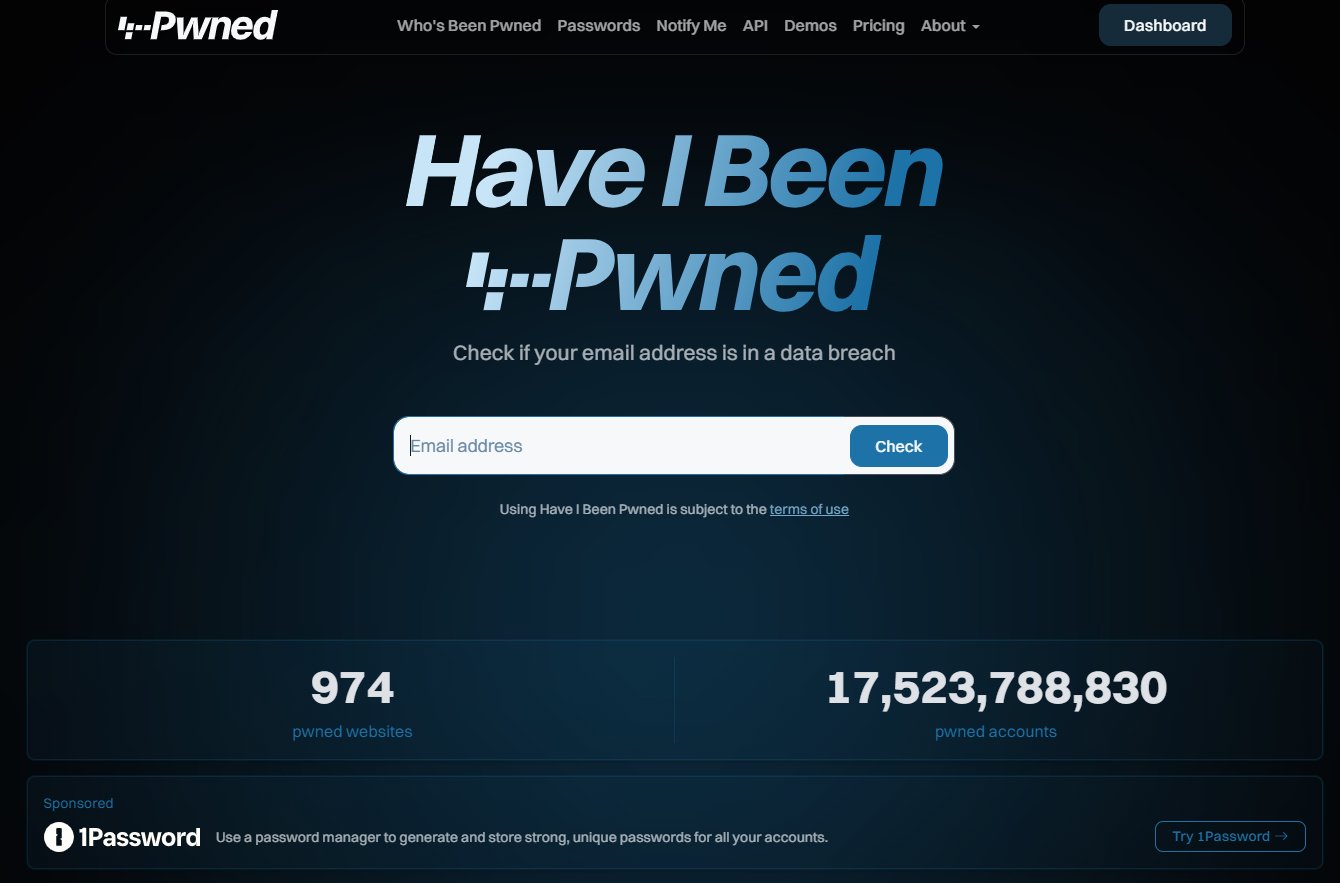
Vrei să știi dacă parolele tale au fost deja furate în breșe de securitate? Intră pe haveibeenpwned.com, introdu adresa ta de email, și vezi lista breșelor în care datele tale au apărut.
Want to know if your passwords have already been stolen in security breaches? Go to haveibeenpwned.com, enter your email, and see the list of breaches where your data appeared.
De ce contează: dacă folosești aceeași parolă peste tot, la Facebook, la eMag, pe un forum, la email, nu contează cât de sigur e fiecare serviciu individual. Dacă un singur site din lista aia e spart (și sunt sparte zilnic), parola ta ajunge în liste publice. Atacatorii iau parola respectivă și o încearcă automat pe toate celelalte servicii populare, sperând că o refolosești. Dacă da, ai pierdut.
Why it matters: if you use the same password everywhere, on Facebook, on eMag, on a forum, on email, it doesn't matter how secure each service is individually. If even one site on that list is breached (and they are daily), your password ends up in public lists. Attackers take that password and automatically try it across all other popular services, hoping you reuse it. If you do, you've lost.
Password managerele moderne (1Password, Keeper) includ dark web monitoring, te anunță automat când o parolă salvată de tine apare într-o breșă, ca să o poți schimba imediat.
Modern password managers (1Password, Keeper) include dark web monitoring, they automatically notify you when a password you've saved appears in a breach, so you can change it immediately.
8.Email profesional, nu de la hostingProfessional email, not from hosting
Emailul tău de business nu ar trebui să fie hostat pe cPanel la un provider de hosting web. Anti-spam-ul lor e de obicei configurat să protejeze pe alții de tine (în caz că tu ești compromis și trimiți spam), nu să te protejeze pe tine. Și mai rău: emailurile trimise de la asemenea servere ajung des în spam la destinatari pentru că domeniul nu are reputație.
Your business email shouldn't be hosted on cPanel at a web hosting provider. Their anti-spam is usually configured to protect others from you (in case you're compromised and sending spam), not to protect you. Worse: emails sent from such servers often end up in recipients' spam because the domain has no reputation.
Pentru business recomand Microsoft 365 Business. La același preț cu Google Workspace primești în plus aplicațiile Microsoft instalate local: Word, Excel, PowerPoint, Outlook, Teams, Access, Publisher. Cu Google ai doar variantele web. Pentru muncă reală, Word desktop e încă mai puternic decât Google Docs, ai caracteristici ca referințe, tabele complexe, colaborare Track Changes mai matură.
For business I recommend Microsoft 365 Business. At the same price as Google Workspace you also get Microsoft desktop apps installed locally: Word, Excel, PowerPoint, Outlook, Teams, Access, Publisher. With Google you only get web versions. For real work, desktop Word is still more powerful than Google Docs, features like references, complex tables, more mature Track Changes collaboration.
9.DKIM, DMARC, SPF, configurate corectDKIM, DMARC, SPF, configured correctly
Astea trei sunt standarde tehnice pentru domeniul tău de email, se configurează în DNS și spun lumii: „emailurile care vin de la domeniul meu sunt legitime doar dacă vin de pe aceste servere și sunt semnate cu acest algoritm". Fără ele, oricine îți poate falsifica adresa de email (spoofing) și trimite mailuri pretinzând că e de la tine.
These three are technical standards for your email domain, configured in DNS and tell the world: "emails from my domain are legitimate only if they come from these servers and are signed with this algorithm." Without them, anyone can spoof your email address and send mails pretending to be you.
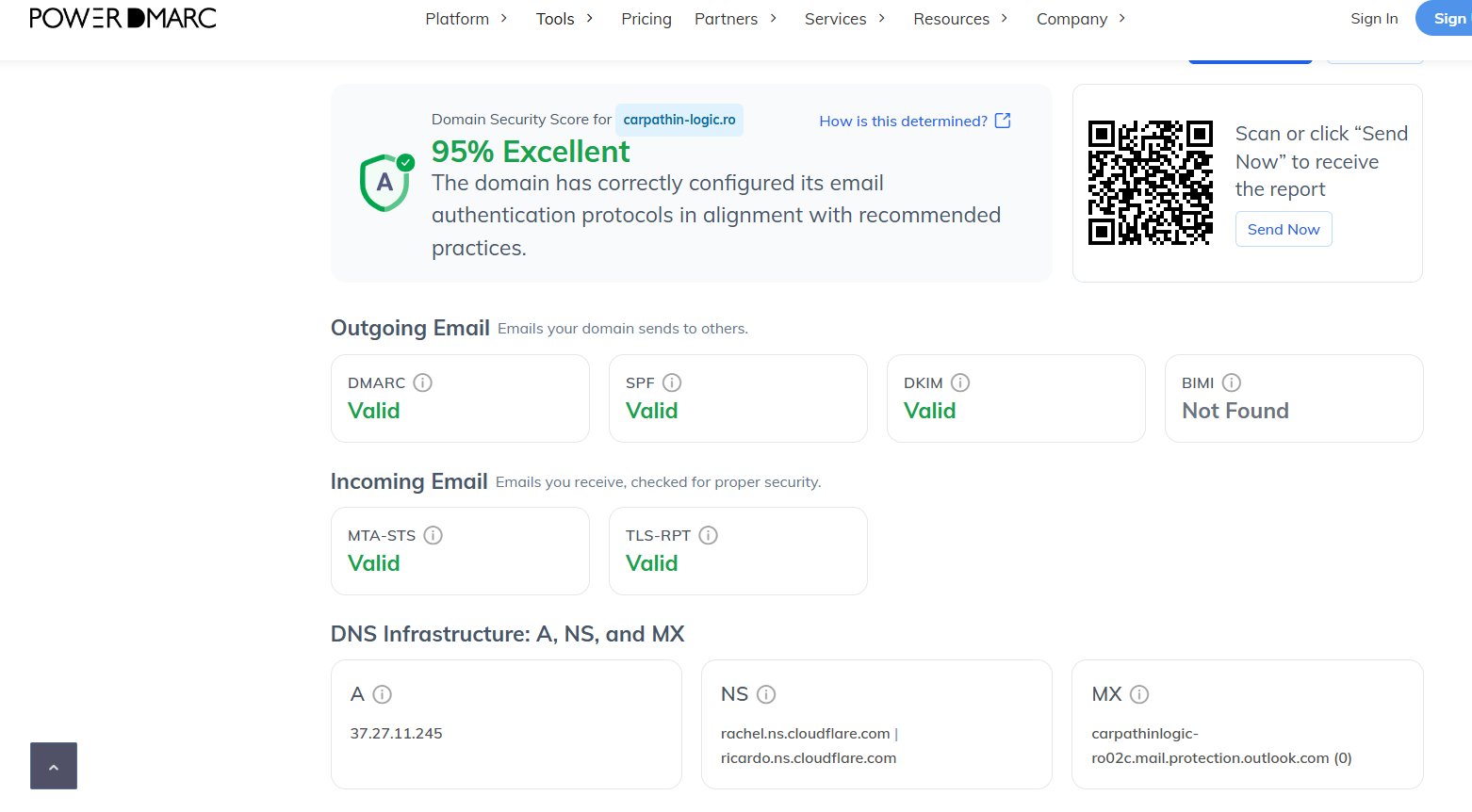
Ca să verifici cum stai, folosește PowerDMARC sau EasyDMARC, introduci domeniul tău și îți spun exact ce ai configurat corect și ce lipsește.
To check where you stand, use PowerDMARC or EasyDMARC, you enter your domain and they tell you exactly what's configured correctly and what's missing.
10.Banner pentru emailuri externeExternal email banner
Un banner vizual aplicat automat emailurilor care vin din afara organizației e una dintre cele mai eficiente apărări împotriva phishing-ului. Dacă cineva îți scrie pretinzând că e „Claudiu Vasilache" dar de pe adresa [email protected], bannerul vizibil în partea de sus a emailului îți dă o pauză imediată: „atenție, e din afara companiei, nu deschide atașamente dacă nu recunoști expeditorul."
A visual banner applied automatically to emails from outside the organisation is one of the most effective defences against phishing. If someone writes to you claiming to be "Claudiu Vasilache" but from the address [email protected], the banner visible at the top of the email gives you an immediate pause: "warning, this is from outside the company, don't open attachments if you don't recognise the sender."

Dacă emailul e din interiorul organizației (coleg), bannerul nu apare, deci intuitiv ști că e un email intern și de încredere.
If the email is from inside the organisation (a colleague), the banner doesn't appear, so you intuitively know it's an internal, trusted email.
Microsoft 365 vs Google Workspace
Aici e un avantaj clar al Microsoft 365: bannerul extern se activează nativ, gratuit, cu două click-uri în Exchange Online. Poți personaliza textul, culoarea, condițiile de aplicare, tot din interfața Microsoft 365.
Here's a clear advantage of Microsoft 365: the external banner is enabled natively, free, with two clicks in Exchange Online. You can customise the text, colour, conditions, all from the Microsoft 365 interface.
Pe Google Workspace, funcționalitatea asta nativă e limitată, maxim poți seta să se modifice subject-ul emailurilor externe (ex: „[EXTERN] subject original"). Pentru un banner vizual colorat în corpul emailului, trebuie să cumperi o soluție third-party ca Exclaimer, care costă în plus per utilizator pe lună.
On Google Workspace, this native functionality is limited, at most you can set the subject of external emails to be modified (e.g. "[EXTERNAL] original subject"). For a coloured visual banner in the email body, you have to buy a third-party solution like Exclaimer, which costs extra per user per month.
Concluzie, fundamentele conteazăConclusion, fundamentals matter
Nu ai nevoie de infrastructură complicată sau de bugete mari pentru majoritatea acestor puncte. Password manager, MFA, BitLocker, conturi separate, Have I Been Pwned, sunt gratuite sau foarte ieftine și rezolvă o uriașă cantitate de probleme.
You don't need complicated infrastructure or big budgets for most of these points. Password manager, MFA, BitLocker, separate accounts, Have I Been Pwned, are free or very cheap and solve a huge amount of problems.
Bitdefender/GravityZone, Microsoft 365 Business și setup-ul corect de DKIM/DMARC/SPF cer investiție, dar sunt fundamentale pentru orice business serios care lucrează cu date.
Bitdefender/GravityZone, Microsoft 365 Business, and proper DKIM/DMARC/SPF setup require investment, but are fundamental for any serious business handling data.
„Securitatea nu e un produs pe care îl cumperi o dată. E o disciplină pe care o întreții, dar fundamentele, odată aplicate, te duc 80% din drum." "Security isn't a product you buy once. It's a discipline you maintain, but the fundamentals, once applied, take you 80% of the way."
Dacă vrei să facem un audit rapid gratuit pe compania ta, să vezi unde stai față de lista asta, scrie-mi la [email protected]. Prima discuție e mereu pe mine.
If you want a quick free audit of your company, to see where you stand against this list, write to me at [email protected]. The first conversation is always on me.